Serial Graph in C++ using Dear ImGUI on Linux
Graphics
When deciding to create a graphical user interface (GUI), there are many options to choose from. One way is to write pixel data into a backbuffer and then let the CPU do the rendering. This is a technique that worked for a very long time (and still does), but it’s slower to render complex graphics.
In the late 90s, graphics cards started to appear more widely on the market and vendors would ship them with graphics API drivers like OpenGL. Complex graphics, like 3D, became more widely available.
Writing an OpenGL/DirectX renderer means that you call specific GPU functions to draw shapes and colors on the screen.
- CPU rendering - Write pixel data to a backbuffer
- GPU rendering - Call the graphics card functions
Both are low-level drawing methods and require a decent amount of code.
Another option is to use a library or a framework that deals with all that complexity and offers ready-to-use components.
Goal
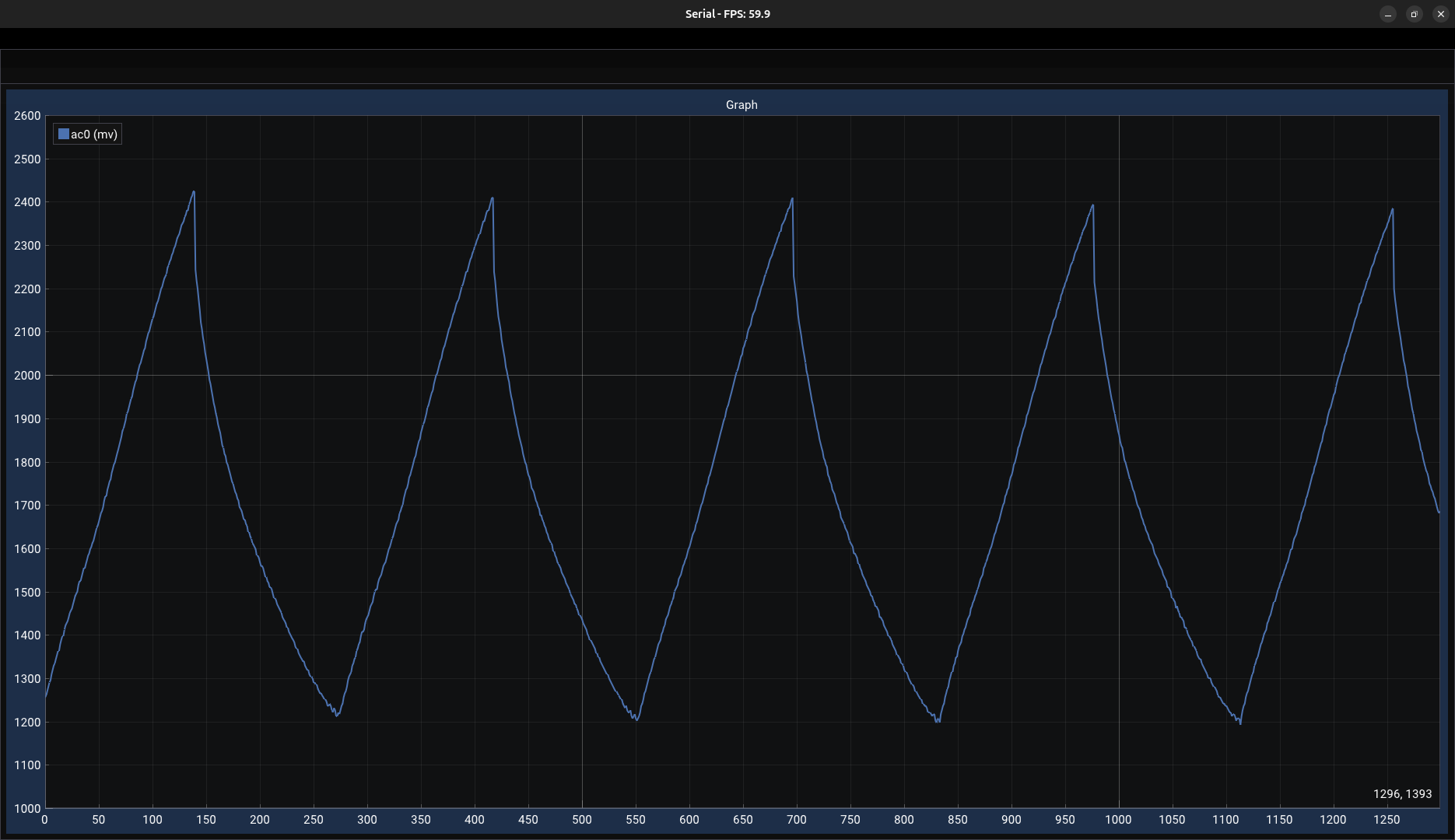
The project goal is to read serial data from a USB device and display it on a graph in real time using Dear ImGUI.
This is the third and final part of a series of articles.
Part 1: A Fading LEDs circuit using 555 Timer on Breadboard
Part 2: ADC and UART on ATmega328P in AVR-C
Serial
Serial is a communication method that sends one bit at a time over a line. A common type is full-duplex UART, where there’s a Transmission line (TX) and a Receiving line (RX) that can exchange data at the same time. In this article series, we connect the ATmega328P to the Linux computer using a Serial-to-USB cable. When we plug the TTL-232R cable into the computer, we are able to read what is sent on the serial line using this command:
cat /dev/ttyUSB0 // cat is to print files, dev is the device folder and tty is a historical reference for teletypeWe want to write a program in C that read the serial data at a similar speed as the cat command.
To achieve similar performance, we need to use the open() function. It’s a a low-level Unix system call that returns a file descriptor.
In Linux, everything is a file, so is the serial port.
#include <stdio.h>
#include <fcntl.h>
#include <termios.h>

int fileDescriptor = open("/dev/ttyUSB0", O_RDWR | O_NOCTTY | O_NONBLOCK);
configureTermios(&fileDescriptor);
Termios
Termios is a header file that helps configure communication ports on Linux. We set the baud rate to 9600, disable parity checking, select an 8-bit data size, etc. In our project, we use raw input mode to read one byte at a time, as oppose to canonical mode, which waits for a full line.
void configureTermios(int* fileDescriptor) {

    struct termios options;
    tcgetattr(*fileDescriptor, &options);               // Get the current options
    cfsetispeed(&options, B9600);                       // Set input baud rate to 9600
    cfsetospeed(&options, B9600);                       // Set output baud rate to 9600
    options.c_cflag &= ~PARENB;                         // Disable parity checking
    options.c_cflag &= ~CSTOPB;                         // Use 1 stop bit
    options.c_cflag &= ~CSIZE;                          // Mask the character size
    options.c_cflag |= CS8;                             // Select 8-bit data size
    options.c_cflag |= (CLOCAL | CREAD);                // Enable receiver and ignore modem control lines
    options.c_cflag &= ~CRTSCTS;                        // Disable hardware flow control
    options.c_lflag &= ~(ICANON | ECHO | ECHOE | ISIG); // Disable canonical, echoing, signal generation (raw input)
    options.c_iflag &= ~(IXON | IXOFF | IXANY);         // Disable software flow control
    options.c_oflag &= ~OPOST;                          // Select raw output
    options.c_cc[VMIN]  = 0;                            // Return immediately if data is available
    options.c_cc[VTIME] = 10;                           // Return 0 if no data arrives within 1 second
    tcsetattr(*fileDescriptor, TCSANOW, &options);      // Set the new options

    return;
}
I highly suggest Michael R. Sweet’s Serial Programming Guide for a complete dive into the subject:
https://www.msweet.org/serial/serial.html#1
Data allocation
This section shows how the data is initialized and allocated. The buffer member is a CSV-style data structure with rows and columns.
It’s designed to hold multiple channels, although in this example we only use one. The xAxisData and yAxisData members are used to store values that will later be used to build the line graph. The other fields (such as head, count, and capacity) help manage the data structure and keep track of its state.
Memory for all buffers is dynamically allocated using malloc().
#define SERIAL_MAX_TOKEN_LEN 16
#define SERIAL_MAX_COLUMNS 8
#define SERIAL_MAX_LINES 1300
#define SERIAL_READ_CHUNK_SIZE 256

typedef char SerialBuffer[SERIAL_MAX_COLUMNS][SERIAL_MAX_TOKEN_LEN];

typedef struct {
    SerialBuffer *buffer;
    int *xAxisData;
    int *yAxisData;
    int capacity;
    int head;
    const char *separator;
} Serial;

void setupSerial(Serial *serial) {
    memset(serial, 0, sizeof(*serial));
    serial->head = 0;
    serial->separator = ",";
    serial->capacity  = SERIAL_MAX_LINES;
    serial->buffer = (SerialBuffer *) malloc(SERIAL_MAX_LINES * sizeof(*serial->buffer));
    serial->xAxisData = (int *) malloc(serial->capacity * sizeof(int));
    serial->yAxisData = (int *) malloc(serial->capacity * sizeof(int));
}

void cleanSerial(Serial *serial) {
    free(serial->buffer);
    free(serial->xAxisData);
    free(serial->yAxisData);
}
Reading from serial
The read() function, in this example, reads 64 bytes of data from the serial port. After getting the data, the program goes through each character one by one and checks if it’s not a line return ('\n'). If it’s not, it adds it to a temporary line buffer. Once it gets a full line, the tokenization process starts.
Since we know the format consists of integer values separated by commas, we use strtok() to break the string into a sequence of delimited tokens. We copy the first token into the CSV buffer and look for the next one. If there are no tokens left, we exit the loop and advance head using a circular buffer method.
void readSerialLineRaw(Serial *serial, int fileDescriptor) {

    static char line[SERIAL_READ_CHUNK_SIZE];
    static size_t position = 0;
    char readBuffer[64];
    ssize_t readBufferBytes = read(fileDescriptor, readBuffer, sizeof(readBuffer));

    for (ssize_t i = 0; i < readBufferBytes; i++) {

        char c = readBuffer[i];

        if (c != '\n') {
            line[position] = c;
            position++;
        }
        else {
            char *token = strtok(line, serial->separator);

            for (int col = 0; token != NULL && col < SERIAL_MAX_COLUMNS; col++) {

                strncpy(serial->buffer[serial->head][col], token, SERIAL_MAX_TOKEN_LEN);
                token = strtok(NULL, serial->separator);
            }

            serial->head = (serial->head + 1) % serial->capacity; // Advance head using circular buffer
            position = 0; // Reset line position
        }
    }
}
The device
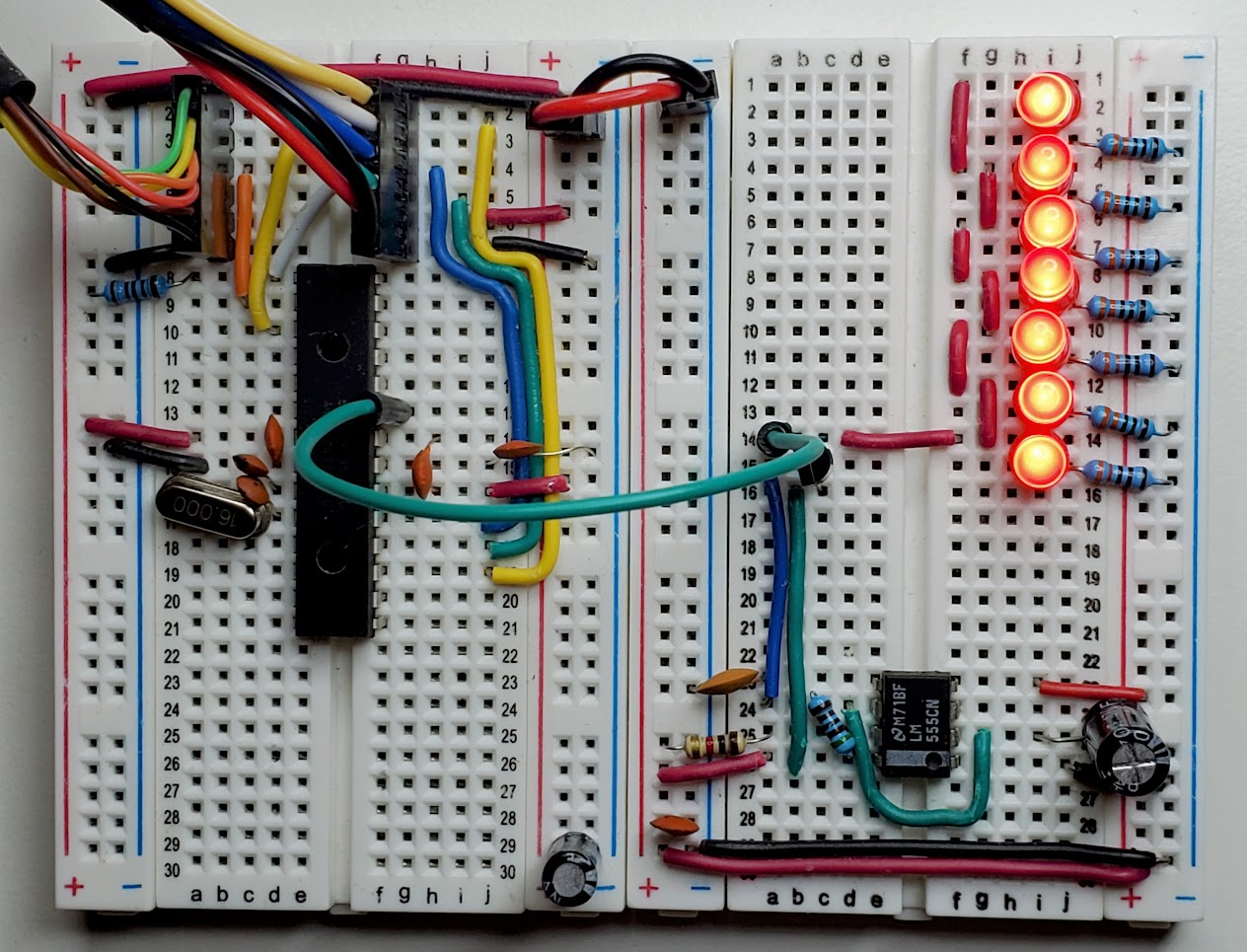
We are using a circuit with a 555 timer that produce a saw wave and another with an ATmega328p that read the signal and send it to the computer via serial.
Dear ImGUI
Dear ImGUI is a popular C++ library for building graphical user interfaces. It’s used in the game industry because it’s quite complete and uses immediate mode. To explain this paradigm, let me quote the creator of Dear ImGUI:
“On every update you take your data and reflect it as UI, meaning the UI always reflects the actual data, the current state of it.” — Omar Cornut
(source: https://youtu.be/2KPUMvyUMzM?si=bG_5STy68Rgiw1lq)
In other words, it encourages having only one source of truth for the data being drawn on the screen. When using immediate mode, the UI is thrown out and rebuilt every frame rather than having persistent UI widgets. On the other side of the spectrum, there’s retained mode that uses long-lived objects to describe the UI state over time.
Initialization
We initialize GLFW which is another library used to create a window and an OpenGL context. Then we initialize ImGUI and add some fonts.
int initImGUI(GLFWwindow** window, ImFont** pFont) {
    // Initialize GLFW
    if (!glfwInit()) {
        fprintf(stderr, "ERROR: Failed to initialize GLFW \n");
	    return -1;
    }

    // Create a window
    GLFWmonitor* monitor = glfwGetPrimaryMonitor();
    const GLFWvidmode* mode = glfwGetVideoMode(monitor);
    *window = glfwCreateWindow(mode->width, mode->height, "Sparkland", NULL, NULL);
    glfwSetWindowAttrib(*window, GLFW_DECORATED, GLFW_TRUE);
    glfwSetWindowPos(*window, 0, 0);

    if (!*window) {
        glfwTerminate();
	    return -1;
    }

    glfwMakeContextCurrent(*window);

    // Initialize OpenGL loader
    if (glewInit() != GLEW_OK) {
    	fprintf(stderr, "ERROR: Failed to initialize OpenGL loader (GLEW) \n");
	    return -1;
    }

    // Initialize ImGui
    IMGUI_CHECKVERSION();
    ImGui::CreateContext();
    ImGuiIO& io = ImGui::GetIO();
    (void)io;

    *pFont = io.Fonts->AddFontFromFileTTF("libs/asset/font/Roboto-Regular.ttf", 18.0f);
    ImGui::StyleColorsDark();

    // Setup Platform/Renderer bindings
    ImGui_ImplGlfw_InitForOpenGL(*window, true);
    ImGui_ImplOpenGL3_Init("#version 330");

    if (!ImPlot::CreateContext()) {
        return -1;
    }

    return 1;
}
Main loop
In the main loop that’s where we read the data and draw the UI.
int main() {
    // Create Window
    GLFWwindow* window = NULL;
    ImFont* pFont = NULL;
    int init = initImGUI(&window, &pFont);

    // Open serial and setup termios
    int fileDescriptor = open("/dev/ttyUSB0", O_RDWR | O_NOCTTY | O_NONBLOCK);
    configureTermios(&fileDescriptor);

    // Setup serial
    Serial serial;
    setupSerial(&serial);

    // Main loop
    while(!glfwWindowShouldClose(window)) {
        // Data
        readSerialLineRaw(&serial, fileDescriptor);

        // Events
        glfwPollEvents();

        // Start ImGui frame
        ImGui_ImplOpenGL3_NewFrame();
        ImGui_ImplGlfw_NewFrame();
        ImGui::NewFrame();

        // Window title
        char title[128];
        snprintf(title, sizeof(title), "Serial - FPS: %.1f", ImGui::GetIO().Framerate);
        glfwSetWindowTitle(window, title);

        // Body
        if (!renderToolbar()) printf("Error: renderToolbar failed");
        if (!renderGraphSerial(&serial)) printf("Error: renderGraphSerial failed");

        // Rendering
        ImGui::Render();
        glClear(GL_COLOR_BUFFER_BIT);
        ImGui_ImplOpenGL3_RenderDrawData(ImGui::GetDrawData());
        glfwSwapBuffers(window);
    }

    // Free memory
    cleanSerial(&serial);
    close(fileDescriptor);
    cleanIMGUI(&window);

    return 0;
}
Graph rendering
Here is the code used to build the graph.
int renderGraphSerial(Serial *serial) {

    for (int i = 0; i < serial->capacity; i++) {
        int index = (serial->head - serial->capacity + i + serial->capacity) % serial->capacity;
        serial->xAxisData[i] = i;
        serial->yAxisData[i]  = strtof(serial->buffer[index][0], NULL);
    }

    ImGui::SetNextWindowPos(ImVec2(0, 70), ImGuiCond_Always);
    ImGui::SetNextWindowSize(ImVec2(
                                    ImGui::GetIO().DisplaySize.x-0,
                                    ImGui::GetIO().DisplaySize.y-70),
                                    ImGuiCond_Always);
    ImGui::Begin("plot_container", NULL,
                 ImGuiWindowFlags_NoMove |
                 ImGuiWindowFlags_NoCollapse |
                 ImGuiWindowFlags_NoResize |
                 ImGuiWindowFlags_NoTitleBar);

    double y_min = 1000;
    double y_max = 2600.0;

    if (ImPlot::BeginPlot("Graph", ImVec2(-1, ImGui::GetContentRegionAvail().y))) {
        ImPlot::SetupAxisLimits(ImAxis_Y1, y_min, y_max, ImGuiCond_Always);
        ImPlot::PushStyleVar(ImPlotStyleVar_LineWeight, 2.0f);
        ImPlot::PlotLine("ac0 (mv)", serial->xAxisData, serial->yAxisData, serial->capacity);
        ImPlot::PopStyleVar();
        ImPlot::EndPlot();
    }

    ImGui::End();
    return 1;
}
Makefile
# Makefile
CXX = g++
CXXFLAGS = -O0 -g -Ilibs/imgui -Ilibs/backends -Ilibs/implot -MMD -MP
LDFLAGS = -lglfw -lGL -lGLEW
TARGET = main
IMGUI_SRC    = $(wildcard libs/imgui/*.cpp)
BACKEND_SRC  = libs/backends/imgui_impl_glfw.cpp libs/backends/imgui_impl_opengl3.cpp
IMPLOT_SRC   = libs/implot/implot.cpp libs/implot/implot_items.cpp
CORE_SRC     = core.cpp
VIEW_SRC     = view.cpp
SRC = $(IMGUI_SRC) $(BACKEND_SRC) $(IMPLOT_SRC) $(CORE_SRC) $(VIEW_SRC)
OBJ = $(patsubst %.cpp, bin/%.o, $(SRC))
DEP = $(OBJ:.o=.d)

all: $(TARGET)

$(TARGET): $(OBJ)
	$(CXX) $(CXXFLAGS) $^ $(LDFLAGS) -o $@

bin/%.o: %.cpp
	mkdir -p $(dir $@)
	$(CXX) $(CXXFLAGS) -c $< -o $@

clean:
	rm -rf bin/* $(TARGET)

-include $(DEP)

.PHONY: all clean
Resources
Full code: https://github.com/larsenhupin/SerialGraph
Dear ImGUI: https://github.com/ocornut/imgui